 nonoha Hub
Getting started
Get nonoha-engine from GitHub and run the template workspace. You watch an app process a signal in the browser, then read and change the same graph through its JSON file and the API.
nonoha Hub, the desktop app, is in pre-release. Once it is released, you can create workspaces in nonoha Hub and run them with the editor included. This page starts from the public repository.
What you need
- Git
- uv, the package and project manager for Python. If you don't have Python 3.11, which the engine uses, uv installs it.
Get the engine
Clone the repository with its submodules and install the dependencies. The submodules are nonoha-core, the core of the graphs, and sci-nodes, a set of nodes that use SciPy.
git clone --recursive https://github.com/viestyle-dev/nonoha-engine.git
cd nonoha-engine
uv sync
On Windows, run the same commands in PowerShell.
Run the template workspace
Start the engine with the template workspace.
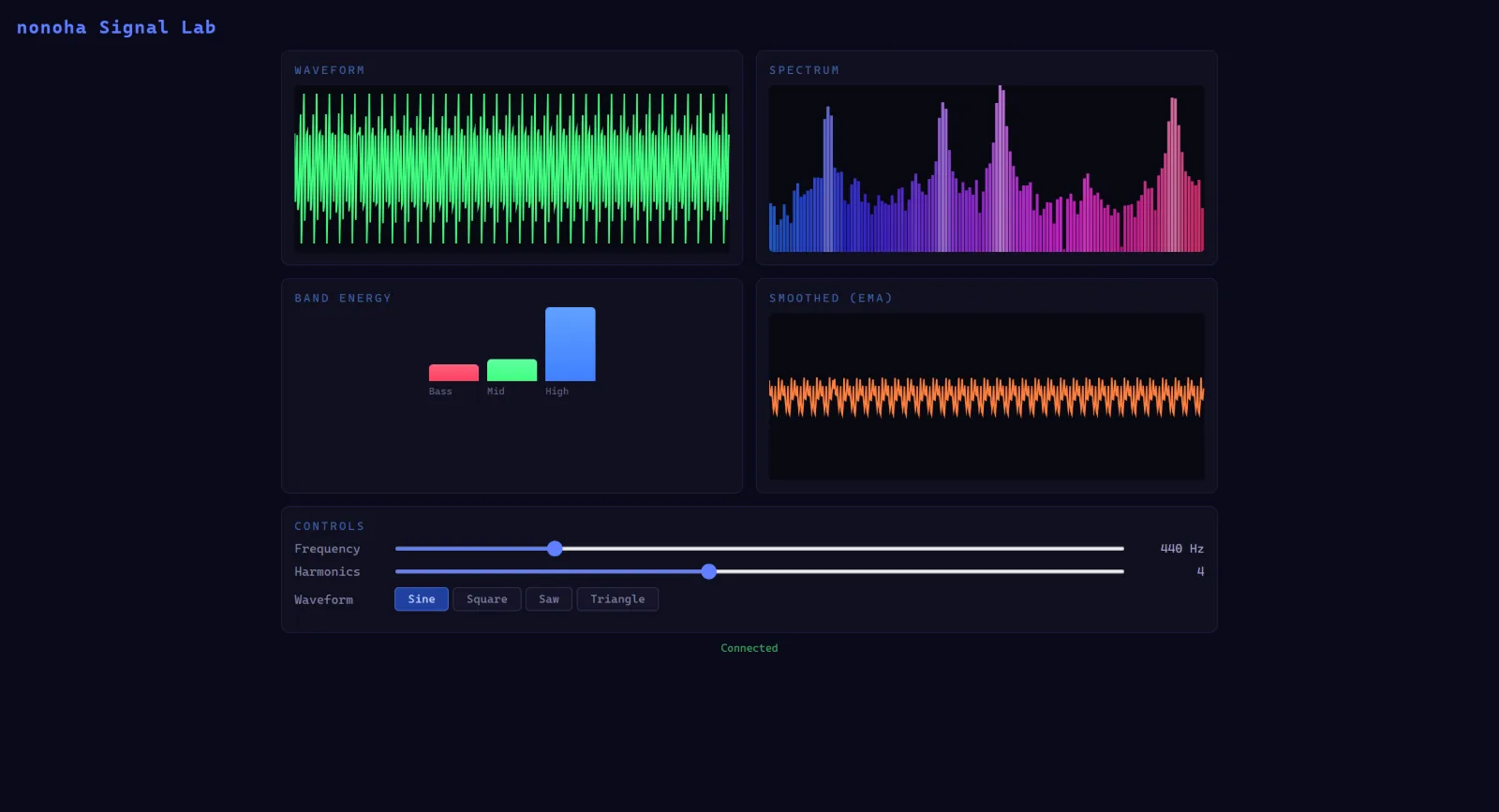
uv run python main.py --vnf templates/default/flows/default.vnf --plugins ./templates/default/pluginsOpen http://localhost:8000/app in your browser to see the template's app, Signal Lab. It draws a synthesizer's waveform, its spectrum, the energy per band, and the signal smoothed by an EMA filter in real time, and you can change the frequency, the number of harmonics, and the waveform from the page. To stop the engine, press Ctrl+C in the terminal.
Read the graph
A workspace's graph is a JSON file that both people and machines can read. The template's app graph is templates/default/flows/default.vnf/graphs/app.vng/graph.json. This excerpt shows its nodes, their properties, and the edges between them.
{
  "nodes": {
    "Clock_1": { "type": "Clock", "properties": { "fs": 600.0, "pack_size": 20 } },
    "Synthesizer_1": { "type": "Synthesizer", "properties": { "frequency": 440.0, "harmonics": 4, "waveform_type": 0 } },
    "EmaFilter_1": { "type": "EmaFilter", "properties": { "in_type": "f32", "alpha": 0.3 } },
    "SpectrumAnalyzer_1": { "type": "SpectrumAnalyzer", "properties": { "fft_size": 256, "bass_cutoff": 0.15, "mid_cutoff": 0.5 } }
  },
  "edges": [
    { "source": "Clock_1.times", "target": "Synthesizer_1.time" },
    { "source": "Synthesizer_1.waveform", "target": "EmaFilter_1.series" },
    { "source": "Synthesizer_1.waveform", "target": "SpectrumAnalyzer_1.signal" },
    { "source": "EmaFilter_1.series", "target": ".smoothed" }
  ]
}
A name that starts with . (such as .smoothed) is an input or output port of the graph itself. The app's page talks to the graph through these ports.
Clock and EmaFilter are standard nodes built into the engine. Synthesizer and SpectrumAnalyzer are nodes written in plain Python, in the template's plugin templates/default/plugins/user-nodes. The catalog command writes every node you can use to a JSON file:
uv run python main.py --plugins ./templates/default/plugins catalog -o catalog.jsonRead and write through the API
While it runs, the engine provides a REST API and a WebSocket API. With the engine running, get information about the graph from another terminal.
curl http://localhost:8000/node-flow/graphs
curl http://localhost:8000/node-flow/graphs/app/nodes
curl http://localhost:8000/node-flow/graphs/app/nodes/EmaFilter_1/properties
Lower EmaFilter's alpha, and the line in the app's SMOOTHED (EMA) panel gets smoother.
curl -X PATCH http://localhost:8000/node-flow/graphs/app/nodes/EmaFilter_1/properties -H "Content-Type: application/json" -d '{"alpha": 0.05}'In PowerShell, use Invoke-RestMethod.
Invoke-RestMethod http://localhost:8000/node-flow/graphs
Invoke-RestMethod -Method Patch -Uri http://localhost:8000/node-flow/graphs/app/nodes/EmaFilter_1/properties -ContentType application/json -Body '{"alpha": 0.05}'
A property changed through the API is saved to graph.json too. To keep the template's files as they are, start the engine with --readonly. To edit the file itself, stop the engine first, and start it again after editing. An AI agent can edit the file or call the API; both change the same graph. The engine lists its API at http://localhost:8000/docs.
What to read next
- Concepts: workspaces, graphs, nodes, ports, and the data that flows.
- Writing nodes and plugins: add nodes to the template's plugin.
- Your own web UI: write a page that talks to the graph.
- The editor (nonoha-editor), where you check and edit graphs as diagrams, runs in the browser. The public nonoha-engine does not include a build of it; nonoha Hub's distribution does.
- nonoha-engine's API reference describes the API in detail.
- Ecosystem lists the repositories that make up nonoha.